The operating system behind your business.
Sorbetto connects the work your team already does every day: items, vendors, purchase orders, receipts, production, inventory movements, vendor bills, payments, shipments, and reports. The result is one operational record instead of a collection of disconnected tabs.
Running the business on data you don't trust.
- Standard costing hides meaningful cost swings.
- Margins rely on estimated logistics costs.
- Marketing spend scales on inflated assumptions.
- Month-end discrepancies turn into multi-week investigations.
- Revaluing closed periods is the norm, not the exception.
Example flow: purchase order to payment.
One purchasing workflow shows how Sorbetto keeps the documents connected: create the PO, receive the goods, enter the bill, then record the payment.
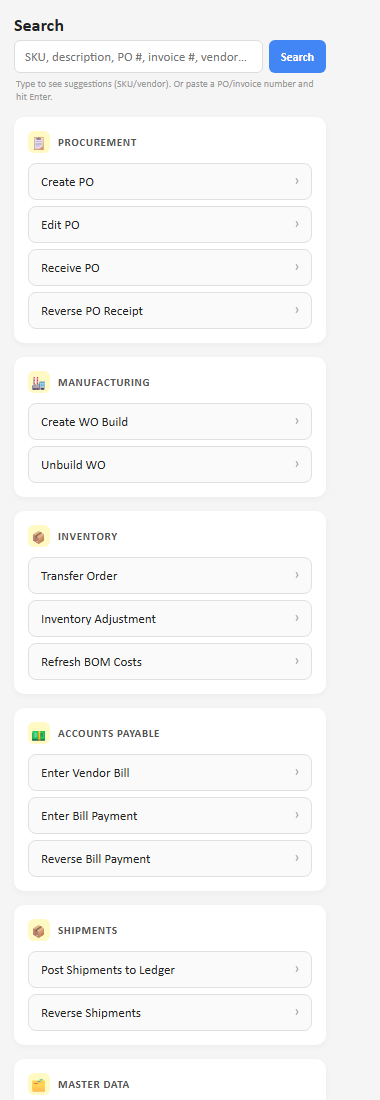
The purchasing workflow starts from the Procurement section: create the PO first, then receive against it when the goods arrive.
The PO records the vendor, location, items, quantities, and expected costs. This example uses fake vendor and item data.
Receiving updates inventory and preserves the PO history. Partial receipts stay tied to the original order.
The bill can be matched to what was actually received, so AP is not guessing from a disconnected invoice.
Once paid, the vendor balance clears while the full document trail remains searchable from the PO or vendor.
We help turn your current operating data into the system.
Sorbetto is not a blank tool you configure alone. We map the operation, collect the right data in templates, configure the workflows, and train your team on the exact process they will use.
We review the spreadsheets, vendors, locations, products, purchasing process, inventory movements, AP flow, and reports you rely on today.
You populate structured templates for master data and any historical data you want carried forward. We help define what matters and clean up the edges.
- Items, vendors, locations, terms, and lists
- BOMs, component costs, and units of measure
- Open POs, starting inventory, bills, or other history you choose to bring in
Your templates become the operating structure: purchasing, receipts, builds, transfers, adjustments, shipments, vendor bills, payments, and reports.
Your team walks through the live workflows with your language and data, then moves into daily operations with support during the first weeks.
Trigger the work without leaving Slack.
For teams already living in Slack, Sorbetto can become an action layer there too. Start a task, answer Sorbetto's follow-up questions, and get a completion confirmation without opening another tool.
What gets easier.
Ready to see it on your data?
We map your current operating model into one connected system.
Get in touch